Spotty: Language-Guided Semantic Navigation for Spot
A voice-controlled interface that grounds natural-language commands in a semantic spatial memory, letting Boston Dynamics' Spot navigate by meaning ("go to the kitchen", "find the coffee machine") rather than coordinates.
Spotty is a voice-controlled interface for Boston Dynamics’ Spot that lets a user talk to the robot in natural language — “go to the kitchen”, “find the coffee machine”, “what do you see?” — and have it act sensibly. The core idea is to give Spot’s purely geometric navigation stack a semantic spatial memory: an offline pipeline annotates every place on the robot’s map with a location label and a language description built from off-the-shelf foundation models (CLIP, GPT-4o-mini), and an online loop turns speech into grounded robot actions through an LLM function-calling dispatcher. The whole system runs on a real Spot using commodity APIs and cost about $5 in API calls to build and demo.
Code: github.com/vocdex/SpottyAI
Motivation
Spot ships with a capable navigation stack, but it reasons in geometry, not in meaning. Its GraphNav service builds a locally consistent graph of waypoints (positions) and edges (traversable paths) and localizes robustly against it — yet a waypoint is just an ID with a reference frame and some sensor snapshots. Nothing in that representation knows that one waypoint is “the kitchen” or that a coffee machine is visible from another. A command like “take me to the coffee maker” is therefore not something GraphNav can act on directly.
After seeing Boston Dynamics’ ChatGPT-powered Spot demo, I wanted to understand how much of that behaviour is a fundamentally hard research problem versus careful systems engineering on top of now-commodity models. This project is my attempt to build a comparable interface from scratch and report honestly on what was easy, what was hard, and where it breaks. The short answer: the perception and language components are remarkably accessible today; the difficulty is almost entirely in making them reliable together on a physical robot.
Because our Spot has no manipulator arm, I restrict the scope to navigation and perception — no grasping or physical interaction.
System overview
Spotty is organized into two phases. An offline mapping phase turns a teleoperated walk-through into a semantically annotated map. An online interaction phase then serves voice commands against that map in real time. The design is deliberately modular — audio, vision, navigation, and retrieval are separate components coordinated by a single interface — so each part can be tested and swapped independently.
Building a semantic map
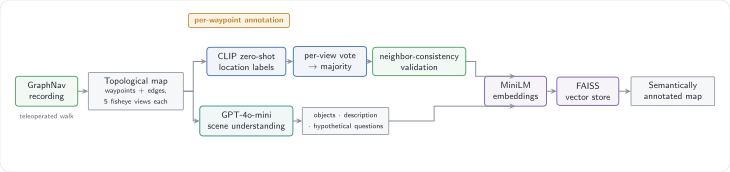
A topological map from GraphNav. I first drive Spot through the environment once to record a GraphNav graph. Each waypoint stores a snapshot containing the robot’s five fisheye camera images (front-left/right, left, right, back) plus depth and, optionally, AprilTag detections. These images are the raw material for semantics: everything below is about attaching meaning to waypoints without touching the geometry GraphNav already gets right.
I annotate each waypoint at three levels — a coarse location label, a fine-grained scene description, and an optional manual override for the cases the automated methods get wrong.
1. Location labels with CLIP + neighbour consistency. I use CLIP zero-shot to classify each waypoint into a small set of location names (“kitchen”, “office”, “hallway”, …). Every usable camera view at a waypoint casts a vote, and the majority wins:
text_embeddings = clip.encode_text(["kitchen", "office", "hallway", ...])

def classify_waypoint(snapshot):
    votes = {}
    for image in snapshot.images:
        if is_usable(image):                       # skip depth / unused sources
            emb = clip.encode_image(preprocess(image))
            label = location_labels[argmax(cosine_similarity(emb, text_embeddings))]
            votes[label] = votes.get(label, 0) + 1
    return most_common(votes) if votes else "unknown"
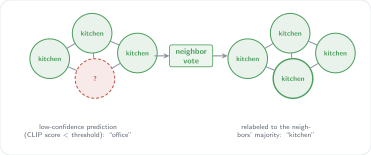
The failure mode in our lab was visual near-duplication — white walls and similar furniture make many places look alike to CLIP, so isolated waypoints get confidently mislabeled. I exploit a structural prior the map already gives us for free: physically adjacent waypoints usually belong to the same room. When a prediction is low-confidence, I defer to the majority label of its graph neighbours.
def validate_label(waypoint_id, predicted, confidence):
    if confidence >= CONFIDENCE_THRESHOLD:
        return predicted                           # trust confident predictions
    neighbors = graph.connected_waypoints(waypoint_id)
    neighbor_labels = [labels[n] for n in neighbors if n in labels]
    if not neighbor_labels:
        return predicted
    majority, ratio = most_common_with_ratio(neighbor_labels)
    if ratio >= NEIGHBOR_THRESHOLD and majority != predicted:
        return majority                            # neighbours strongly disagree
    return predicted
This is a small amount of code, but it noticeably cleans up labels in ambiguous transition zones like doorways, where a single view can easily flip the vote.
2. Scene understanding with GPT-4o-mini. Location labels tell the robot where it is; to answer object-level queries it also needs to know what is there. For each front-camera view I prompt GPT-4o-mini to return a structured description, using a Pydantic schema so the output is machine-readable rather than free-form prose:
class WaypointAnnotation(BaseModel):
    visible_objects: List[str]
    scene_description: str
    hypothetical_questions: List[str]   # questions this view could answer
Enforcing structured outputs removed essentially all of the brittle response-parsing I would otherwise have needed. The hypothetical questions field is a small trick that pays off at retrieval time: by having the model imagine questions each scene could answer, the stored text aligns better with the kinds of natural-language queries users actually ask.
3. A searchable semantic memory.
Each waypoint’s location label, object list, and scene description are embedded
with a MiniLM sentence-transformer and stored in a
FAISS index alongside the waypoint ID
and coordinates. At query time a user request is embedded and matched against this
store by L2 distance, so “where is the coffee maker?” resolves to the waypoints
whose descriptions are semantically closest — the retrieval-augmented backbone
that grounds language in specific places on the map.
Talking to the robot
The online loop closes the gap from speech to action. It listens for a wake word, transcribes the request, asks an LLM to choose exactly one robot function to call, executes it, and speaks a response — all while keeping a short conversation memory.
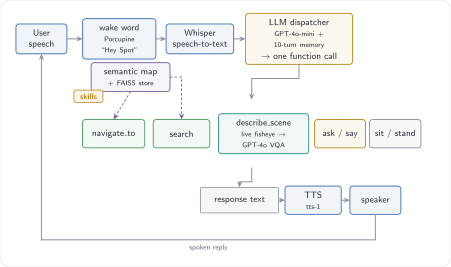
Speech in, speech out. A Porcupine wake-word detector listens continuously for “Hey Spot” so the system is not streaming audio to the cloud unprompted. Once triggered, the utterance is transcribed by OpenAI Whisper, and every spoken reply is synthesized with OpenAI text-to-speech.
An LLM as a function dispatcher. The heart of the system is a prompt that turns GPT-4o-mini into a router: given the transcript and recent history, it must reply with exactly one call from a small robot API.
You are controlling Spot, a quadruped robot with navigation, speech, and memory.
Always reply with a single function call.

  navigate_to(location, phrase)   move to a location while speaking
  search(query)                   find an object via scene understanding
  describe_scene(query)           answer a question about the live camera views
  ask(question) / say(phrase)     dialogue
  sit() / stand()                 posture

Possible locations: kitchen, office, hallway, study room, robot lab, base station
A lightweight parser extracts the chosen call and dispatches it to the matching skill. Constraining the model to a single, well-specified function per turn keeps behaviour predictable and made the mapping from language to action far more robust than free-form generation.
Search with disambiguation. Object queries route through the semantic memory.
search("coffee maker") retrieves the closest waypoints; if matches fall in more
than one room, Spot doesn’t guess — it asks:
User:  "Can you take me to the coffee maker?"
Spot:  "I found a coffee maker in two places — the kitchen and the break room.
        Which would you prefer?"
User:  "Kitchen, please."
       → navigate_to("kitchen")
Live visual question answering. describe_scene bypasses the stored map and
sends the robot’s two current front-camera views to GPT-4o-mini, which fuses them
into a single description of what Spot sees right now — useful for questions the
offline annotations can’t anticipate.
Conversation memory. The dispatcher keeps a bounded history (~10 turns), which gives Spot enough short-term state to resolve references and chain requests like “go to the kitchen, then tell me what you see.” The system prompt also carries a light persona, mostly because a talking robot that is a little funny is more pleasant to work alongside.
Deployment and results
I deployed and tested Spotty on a Spot at FAU’s chair of Automatic Control. The evaluation here is qualitative — this was a systems project, not a benchmark — but the behaviours below were reproducible across sessions.
The recorded GraphNav map, before any semantic annotation, is just geometry:
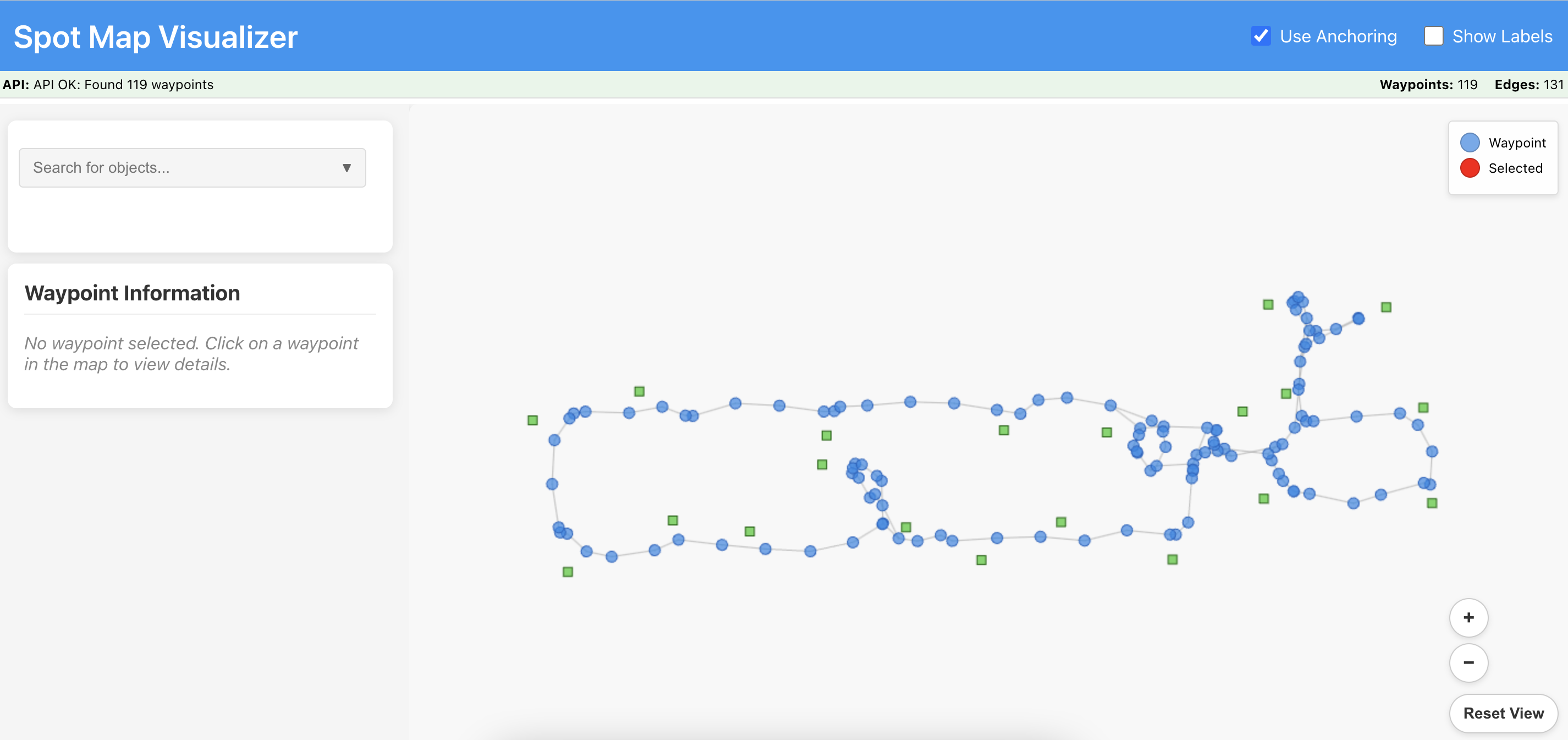
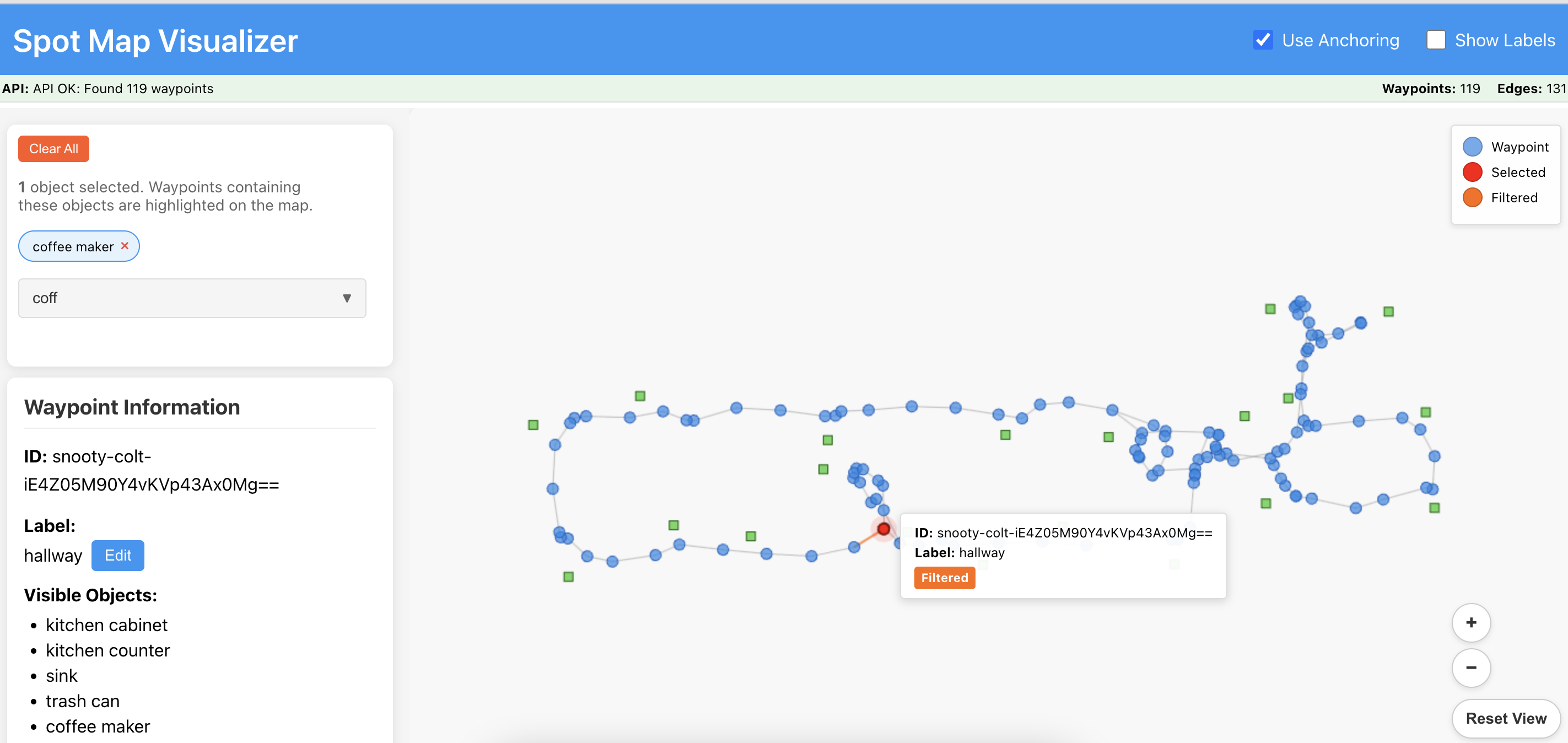
After annotation, querying the semantic store for an object highlights the matching waypoint on the map:
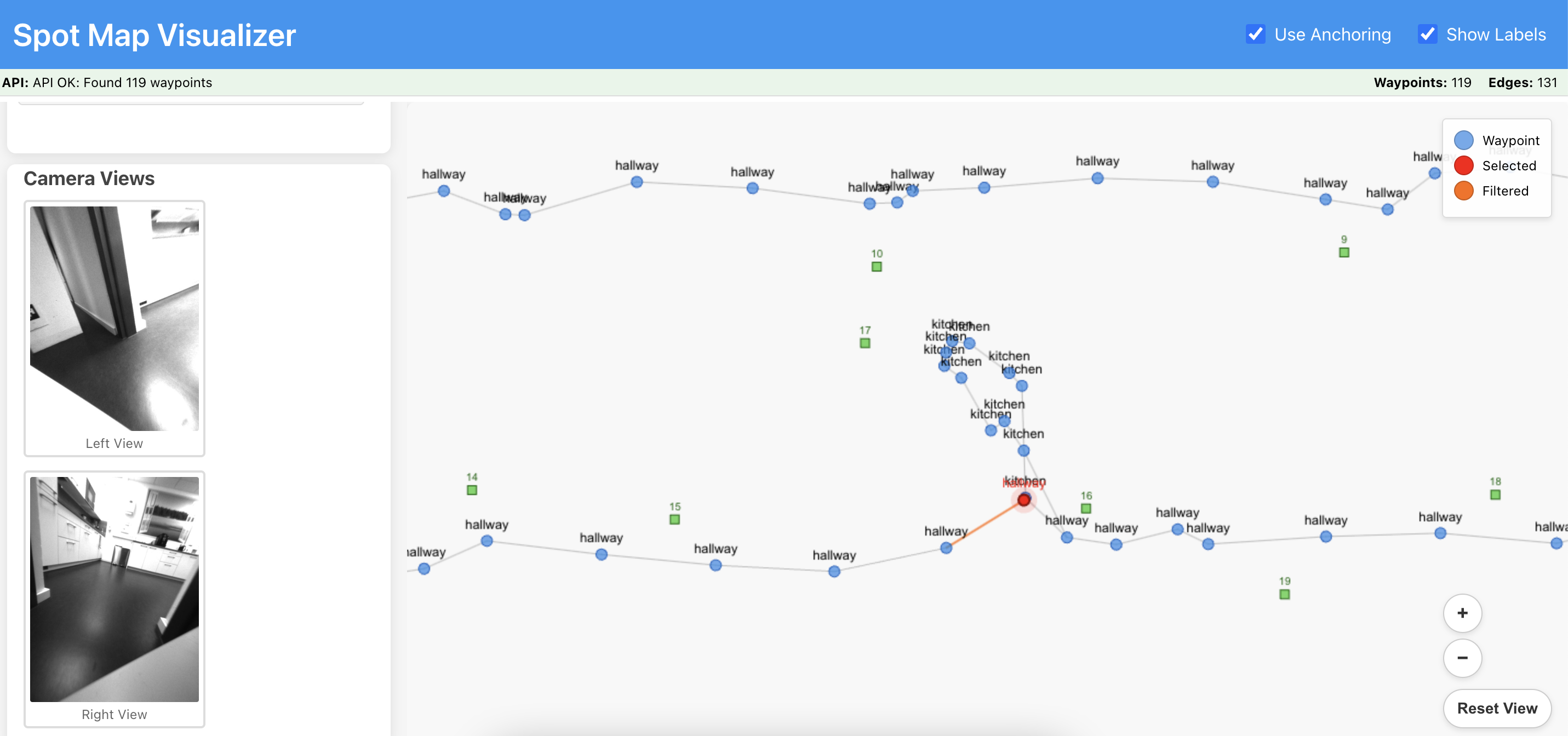
…and the front-camera views stored at that waypoint confirm the match:
A few findings stood out:
- Language-to-action mapping was reliable. Constrained to one function call per turn, the dispatcher correctly interpreted the large majority of natural-language commands in informal testing.
- Object search generalized well. Spot located items such as a coffee maker, a fire extinguisher, and a desk chair from their stored descriptions alone.
- Foundation models are robust to bad images. GPT-4o-mini produced accurate object lists and descriptions from low-resolution, grayscale fisheye frames — considerably better than I expected from that image quality.
- It’s cheap. Building the map and running the demos cost roughly $5 in API calls, which would have been unthinkable only a couple of years earlier.
Limitations
Being honest about where it struggles:
- Localization is not free. GraphNav occasionally lost track of its pose in feature-poor areas; adding AprilTag fiducials near corners mitigated but did not eliminate this.
- “At a location” is ambiguous. Humans and robots disagree about what counts as arriving somewhere. I added explicit approach points to get Spot usefully close to objects of interest.
- The dispatcher can misread compound requests. Complex or ambiguous phrasing sometimes produced the wrong function call; more in-context examples and a clarify-then-act fallback helped.
- Single environment, no quantitative benchmark. Results are from one lab and reported qualitatively; I did not measure success rates under controlled conditions.
What I learned
When I started, I assumed I was missing some trick. I wasn’t. Everything the system needs already exists and is a few API calls away: GraphNav handles navigation, CLIP labels images, an LLM turns sentences into actions, a vector store makes the map searchable, and off-the-shelf models handle speech. I didn’t build any of it.
The work was in the joints between those pieces. An LLM will happily return a sentence that reads like a command but can’t actually be run, so I had to force it to reply with exactly one function call. CLIP labels a room with complete confidence and gets it wrong, so I had to check its guesses against the map. When a search matched two rooms, the robot had to ask which one instead of guessing. None of this is hard the way a research problem is hard. It’s a pile of small things that each have to work, and mostly don’t on the first try.
What surprised me was how much one person can do now. A few years ago, a robot you could talk to that finds its way around by meaning would have been a team’s project. This was one semester and about five dollars. The models are good enough that building them isn’t the hard part anymore. Wiring them together so they don’t fall over is.
Future directions
Natural extensions I’d pursue with more time: dynamic re-annotation as the environment changes, multi-step task planning for compound goals, and — once the budget allows an arm — grounding the same language interface in manipulation.
Acknowledgements
Thanks to the Chair of Automatic Control at FAU for providing the robot for this semester project, and to the teams behind the Spot SDK, CLIP, FAISS, and the OpenAI APIs that made it possible.